Gym Member Consent and Privacy: A Practical Workflow for Gyms
A practical guide for gym owners and staff to build clearer member consent, limit access to shared workout data and support safer trainer collaboration.
In this article
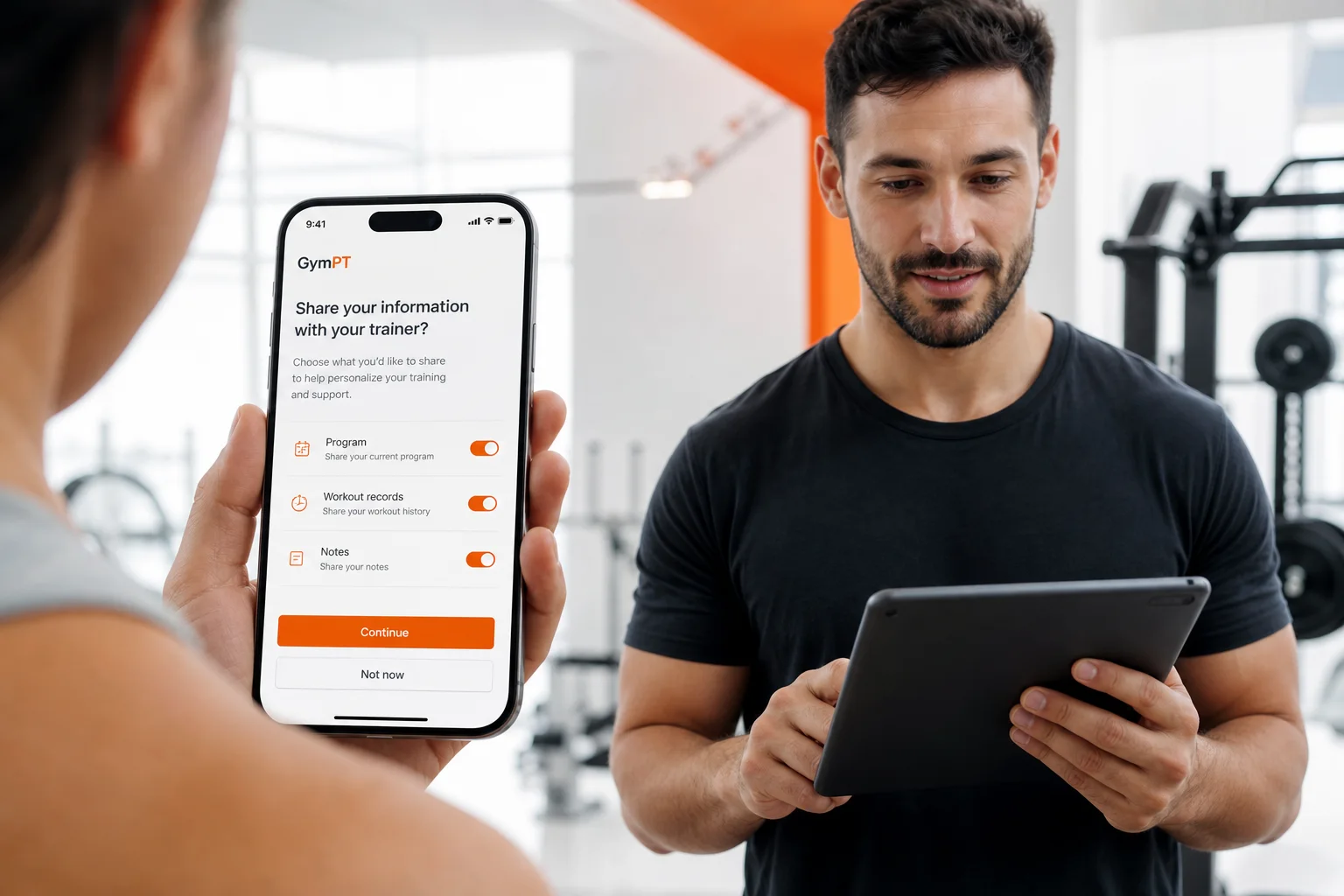
Gym member consent and privacy should be treated as an operating workflow, not a checkbox hidden in onboarding. When a member connects with a gym or personal trainer, everyone should understand what information is shared, who can view it, why access is useful and how the member can change the decision later.
This matters especially when gyms use digital tools for programs, workout records, notes and trainer communication. A good process helps staff collaborate without creating broad, unnecessary access to member information. It also gives members a more confident way to participate in coaching while keeping control over their own training data.
What gym member consent and privacy should accomplish
For a gym, consent is most useful when it answers four practical questions:
- Who is requesting access?
- What information will be visible?
- Why is the information needed?
- How can the member review, change or withdraw the permission?
These questions are more helpful than asking members to approve a vague request to “share data.” A member may want a trainer to review a current program and workout records, but not want every gym employee to see personal notes. Another member may approve a connection temporarily while working through a specific program proposal.
Privacy-focused design generally favors collecting and sharing only what is needed for the stated purpose. For gyms, that means avoiding the assumption that a branch, manager or staff team should automatically have access to every member’s training history. Access should follow the member’s connection and the organization’s role structure.
Start with a simple data map
Before changing software settings or staff procedures, list the types of information your gym may handle. Keep the list practical rather than technical. Common categories include:
- Member profile and contact details
- Workout programs and exercise selections
- Completed workout records
- Training notes written by the member or trainer
- Program proposals prepared for member review
- Optional summaries or progress observations
- Connection details between members, trainers and gym branches
Then record which role needs each category. For example, a personal trainer may need access to a client-permitted program and recent workout records to prepare a sensible follow-up. A branch manager may need to manage staff roles and approved connections without reading the member’s detailed training notes. A front-desk employee may need no access to training data at all.
This role-based approach is more precise than treating “the gym” as one person. It also gives your team a basis for reviewing access when a trainer changes branches, stops working with a client or leaves the organization.
Use layered permission requests
A strong permission request is specific enough for a member to make an informed decision. Instead of one broad approval, separate the common use cases:
- Connection permission: The member approves a connection with a particular gym, branch or trainer.
- Program access: The member permits the trainer to review a selected program or proposal.
- Workout record access: The member permits access to relevant completed training records.
- Notes access: The member decides whether personal training notes should be included.
- Summary access: If a weekly summary is available, the member separately grants the permissions required for that summary.
This structure makes the decision easier to understand and reduces accidental over-sharing. It also helps trainers ask for the minimum information needed for the next coaching task rather than requesting permanent access to everything.
GymPT follows this permission-based model: trainers review only the programs, workout records and notes that clients permit them to share. Optional weekly AI summaries also depend on the appropriate grants. The practical lesson for gym teams is simple: do not describe a connection as unrestricted access, and do not promise staff a gym-wide view of member health or training data.
Make privacy-friendly choices the default
Members should not have to become privacy experts before they can use a digital training workflow. Use defaults that limit exposure and let members choose more sharing when it helps their goals.
- Keep new workout records private until the member chooses to share them.
- Show the named trainer or approved connection receiving access.
- Separate branch access from individual trainer access.
- Do not automatically extend a member’s permission to every staff role.
- Explain whether access covers current information, historical records or both.
- Provide a clear way to review active connections and permissions.
These defaults also reduce staff confusion. When a trainer sees only the information a client has shared, the trainer can discuss any missing context directly with the member instead of assuming the system is incomplete or that another employee should open the record.
Build a permission-based trainer workflow
Your staff process can be short and repeatable. The following example works for a member who wants support from a personal trainer:
- Introduce the purpose. Explain that the trainer can use selected training information to review the member’s current routine and provide coaching feedback.
- Ask for a bounded connection. Identify the trainer and, where relevant, the gym branch associated with the connection.
- Request only relevant data. Ask the member to share the program, workout records or notes needed for the specific review.
- Review before acting. The trainer checks what was actually shared rather than assuming access to a complete history.
- Prepare a proposal. The trainer can draft a program manually or use optional AI support in the web workspace, then review the result using professional judgment.
- Let the member decide. The member reviews the proposal and chooses whether to save and use it.
- Close or revise access. When the coaching relationship changes, review whether the connection and shared data should remain active.
This workflow keeps the member involved at each meaningful stage. It also avoids presenting AI as an independent coach. AI may help organize or draft material, but the trainer remains responsible for reviewing the proposal and the member remains responsible for deciding whether to use it.
For a deeper operational framework, see Gym and Personal Trainer Collaboration: A Permission-Based Workflow and Personal Trainer Client Data Permissions: A Practical Access Workflow.
Separate gym administration from member training data
Gym staff need operational access, but operational access should not be confused with access to personal training records. A branch manager may need to manage which locations are available, which staff roles are active and which GymPT connections are approved. That does not mean the manager should automatically see every member’s programs, notes or workout history.
Define these areas separately:
- Branch administration: Which locations the gym manages.
- Staff roles: What each employee is allowed to do.
- Approved connections: Which member, trainer and gym relationships are recognized.
- Member-shared training information: What the member has permitted for a particular coaching purpose.
Use the same principle when managing multiple locations. A trainer working at one branch should not automatically gain access to another branch’s members simply because both branches belong to the same organization. Review the practical workflow in Multi Branch Gym Staff Access: A Practical Permission Workflow and Gym Staff Roles and Member Permissions: A Practical Access Guide.
Train staff to explain consent clearly
Even a well-designed platform can be undermined by unclear conversations. Give staff a short explanation they can use consistently:
“You choose what to share with this trainer. We are requesting access to the information needed for your coaching review, not automatic access to everything in your account. You can review the connection and change your permissions later.”
Staff should also avoid statements such as “the gym can see all your data” or “the AI will review your whole account.” Those descriptions create expectations that may not match the actual permission model and can damage trust.
When members ask whether information is required, explain the difference between using the core training features and choosing optional support. In GymPT, members can save records and connections with a free account, create a manual program without AI credits, request optional AI assistance or review a PT program proposal. Some optional AI actions may require credits, and eligible Premium features have separate requirements shown before use. These choices should be explained accurately rather than bundled into a general consent request.
Review permissions as part of normal operations
Consent is not a one-time onboarding event. Add a lightweight review at moments when access is likely to change:
- When a member starts with a new trainer
- When a trainer changes branch or role
- When a program is completed or replaced
- When a member asks for a different level of support
- When a staff member leaves the gym
- When a new digital feature changes what information may be processed
Keep an internal record of the decision, the intended purpose and the roles involved. Your organization may have legal and regulatory obligations that vary by location and business model, so use this workflow as operational guidance rather than legal advice. Where the data or service is sensitive, ask qualified counsel to review your notices, contracts and retention practices.
A practical gym privacy checklist
Use this checklist during a monthly staff review:
- Are member-facing permission requests written in plain language?
- Does each request identify the person or role receiving access?
- Can members share a program without sharing every note or record?
- Are branch and staff permissions separated from member training permissions?
- Do trainers review only the information the client has permitted?
- Are AI-assisted summaries or proposals subject to the required member grants?
- Can members change or withdraw a connection through a clear process?
- Are former staff connections and outdated access reviewed promptly?
- Do staff know what they should not claim about gym-wide access?
The goal is not to make coaching difficult. The goal is to make the boundaries visible. When members understand the connection, trainers receive the context they actually need, and gym teams manage roles carefully, digital training becomes easier to trust and easier to operate.